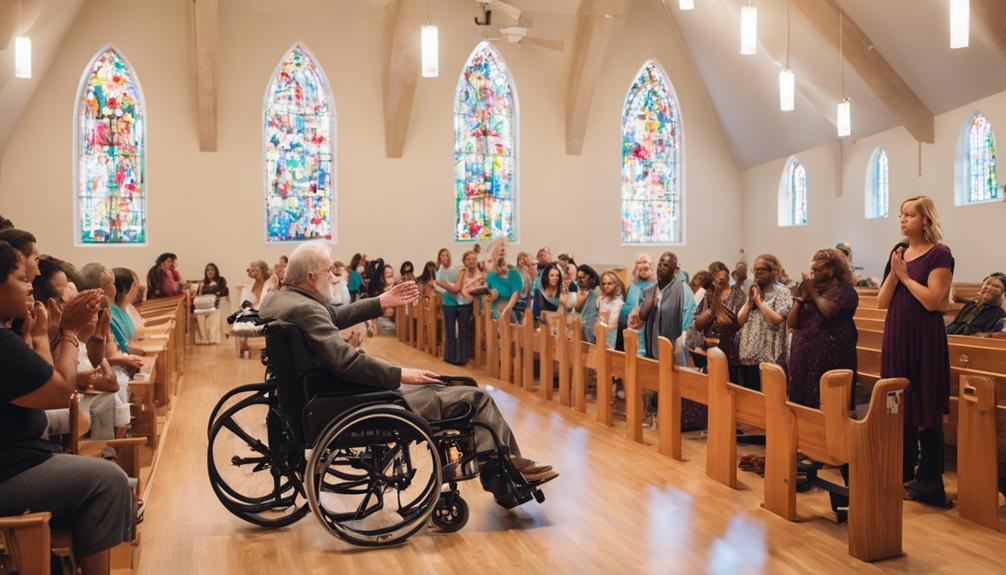
You've probably experienced worship spaces that unintentionally exclude people with disabilities, where outdated technology and inaccessible facilities create barriers to participation and community. To guarantee inclusivity, it's crucial to break down physical barriers, enhance online worship experiences, and provide accessible audio and visual content. You can also overcome language barriers, incorporate assistive technology, and create inclusive online communities. By embracing inclusive worship practices, you can foster a sense of belonging for all. As you explore ways to make your worship space more inclusive, you'll discover innovative solutions to create a welcoming environment for everyone.
Breaking Down Physical Barriers
When you walk into a place of worship, the first thing you notice is the physical space, and it's essential to guarantee that it's accessible to everyone, regardless of their abilities. As a servant of the community, you want to make sure that every individual feels welcome and included.
To start, you'll want to assess the physical barriers that might hinder accessibility. Are the aisles wide enough for wheelchairs and walkers? Are there accessible restrooms and seating areas? Are the worship materials, such as hymnals and Bibles, available in formats accessible to people with visual impairments?
Take it a step further by considering the sensory experience. Is the lighting comfortable for those with sensitivities? Are there quiet spaces for those who might feel overwhelmed? Are the worship services signed or have real-time captioning for the deaf or hard of hearing?
Enhancing Worship Experiences Online
As you work to create a more inclusive worship experience, you’re likely considering how to reach those who can’t physically attend services. You’re probably wondering how to make your online worship experiences more engaging and accessible. By exploring live streaming options and accessible online platforms, you can guarantee that everyone can participate fully, regardless of their physical abilities. This may involve integrating interactive features like live chat, polls, and Q&A sessions during services to foster a sense of community among participants. Additionally, consider leveraging virtual reality in worship services, which can create immersive experiences that replicate the environment of in-person worship. By embracing these technologies, you can ensure that worship remains vibrant and meaningful for all, bridging the gap between those attending physically and those joining from afar.
Live Streaming Options
You can extend your worship community's reach by leveraging live streaming options that cater to diverse needs and preferences, making online worship experiences more inclusive and engaging. By offering multiple streaming platforms, you can accommodate different learning styles, abilities, and device preferences. For instance, you can provide closed captions for the deaf or hard of hearing, or offer audio descriptions for the visually impaired. Additionally, you can use interactive tools, such as live chat or Q&A sessions, to encourage participation and foster a sense of community.
When selecting a live streaming platform, consider factors such as video quality, scalability, and customization options. You may also want to explore platforms that offer features like virtual "bulletin boards" or digital prayer walls, which can enhance the online worship experience. By providing a range of live streaming options, you can create a more inclusive and immersive experience for your online congregation, allowing them to feel more connected and engaged.
Accessible Online Platforms
Design your online platforms to be accessible and user-friendly, guaranteeing that everyone can navigate and engage with your worship content effortlessly. You want to create an inclusive environment where everyone feels welcome and supported. When building your online platforms, consider the needs of people with disabilities. Guarantee that your website and social media platforms are compatible with assistive technologies like screen readers and keyboard-only navigation. Use clear and simple language in your content, and provide alternative text for images and videos. This will enable people with visual impairments to engage with your content. Additionally, provide closed captions and transcripts for your audio and video content, making it accessible to those who are deaf or hard of hearing. By taking these steps, you'll be creating an inclusive online space where everyone can participate and engage with your worship content without barriers.
Accessibility in Audio Content
Your congregation's audio content, including sermons, podcasts, and online worship services, must be accessible to everyone, regardless of their abilities. You can guarantee this by providing transcripts or captions for your audio content. This allows individuals who are deaf or hard of hearing to engage with your message. Additionally, transcripts can be beneficial for those who prefer to learn through reading or need to review the content at a later time.
You can also consider providing audio descriptions for visually impaired individuals. This can be especially helpful for those who cannot see visual elements, such as videos or images, that accompany your audio content. By including audio descriptions, you can paint a verbal picture that allows everyone to imagine and engage with the content.
Furthermore, consider the audio quality and sound levels when producing your content. Guarantee that the volume is consistent and clear, making it easy for everyone to listen and understand. You can also provide options for different listening speeds or formats, such as MP3 or WAV files, to accommodate different needs and preferences.
Visual Aids for Inclusive Worship
As you consider visual aids for inclusive worship, you'll want to think about how to make them accessible to everyone. You'll need to explore accessible projection options that cater to different needs, such as high-contrast displays or assistive listening devices. Additionally, you'll want to prioritize image description importance, ensuring that all participants can engage with visual content.
Accessible Projection Options
By incorporating accessible projection options into your worship services, you can guarantee that visual aids are inclusive and engaging for all congregants. This is especially important for individuals who are visually impaired or have dyslexia. You can achieve this by using high-contrast colors, clear fonts, and adequate font sizes. Consider using sans-serif fonts, which are easier to read, especially for those with dyslexia. Additionally, make sure that your projected images and videos are clear and not overly complex, making it easier for everyone to follow along.
When choosing projection software, opt for ones that offer accessibility features, such as text-to-speech functionality or customizable font sizes. You can also utilize captioning or subtitling for videos and audio content, allowing congregants who require it to fully engage with the worship service. By taking these steps, you can create an inclusive and engaging worship experience that caters to the diverse needs of your congregation.
Image Description Importance
In addition to incorporating accessible projection options, you'll want to make sure that visual aids are made inclusive through image descriptions, providing congregants who are blind or have low vision with a more immersive worship experience. This can be achieved by adding verbal descriptions to visual elements, such as images, videos, or diagrams, allowing everyone to engage with the content.
| Image Type | Description | Tips |
|---|---|---|
| Photos | Describe the main subject, scene, or action | Be concise, but provide enough detail |
| Diagrams | Explain the key elements and relationships | Focus on the most important information |
| Videos | Verbalize the visual content, including actions and settings | Use descriptive language to paint a mental picture |
| Charts/Graphs | Describe the data, trends, and key findings | Highlight the most important insights |
Accessibility in Worship Spaces
You step into a worship space expecting to connect with your community and spirituality, but physical barriers can hinder that experience. Narrow aisles, fixed pews, and inaccessible stages can create obstacles for people with mobility impairments. Additionally, inadequate lighting and poor acoustics can make it difficult for individuals with visual or hearing impairments to fully engage in the service.
As you consider the physical space, ask yourself: Are there ramps or elevators for easy access? Are there wheelchair-accessible seating areas? Are the restrooms and water fountains accessible to everyone? It's crucial to identify and address these barriers to create a welcoming environment for all.
Incorporating accessibility features into worship spaces can be a game-changer. For instance, installing induction loop systems can assist individuals with hearing aids, while Braille signage can help visually impaired individuals navigate the space. Additionally, providing large-print materials, such as hymnals and bulletins, can make sure that everyone can participate fully.
Overcoming Language Barriers
Worship services that cater to diverse linguistic backgrounds can foster a deeper sense of community, but language barriers can isolate individuals who don't speak the dominant language. You want to guarantee that everyone feels included, regardless of their native tongue. By providing language accommodations, you can break down these barriers and create a more inclusive environment.
Here are some strategies to help you overcome language barriers:
| Language Accommodation | Description | Implementation Tips |
|---|---|---|
| Multilingual worship materials | Provide translated worship materials, such as bulletins and hymnals. | Identify the most common languages spoken by your congregation and prioritize translations accordingly. |
| Interpretation services | Offer simultaneous interpretation through headphones or screens. | Train interpreters to ensure accuracy and clarity. |
| Bilingual worship leaders | Incorporate worship leaders who can communicate in multiple languages. | Rotate worship leaders to cater to different linguistic groups. |
Assistive Technology in Worship
By incorporating assistive technology into your worship services, you can create a more inclusive environment for individuals with disabilities. This technology can help bridge the gap between able-bodied and disabled worshippers, allowing everyone to fully participate in the worship experience. For instance, you can use audio induction loops or FM systems to assist individuals with hearing impairments. These systems transmit sound directly to hearing aids or cochlear implants, enabling individuals to fully engage with the sermon or music.
You can also utilize visual aids like closed captions or sign language interpretation to cater to deaf or hard-of-hearing worshippers. Additionally, incorporating wheelchair-accessible seating and ramps can ensure that physically disabled individuals can easily navigate the worship space. Furthermore, you can provide assistive listening devices, such as infrared or FM systems, to help individuals with hearing impairments.
Creating Inclusive Online Communities
As online communities become an essential part of faith-based gatherings, ensuring their inclusivity is crucial for fostering a sense of belonging among all members. You play an important role in creating an inclusive online community that welcomes and supports diverse individuals. Start by designing your online platforms to be accessible and user-friendly for everyone, including those with disabilities. This means using clear and simple language, providing alternative text for images, and ensuring that all content is compatible with assistive technologies.
You should also establish clear guidelines for online interactions, promoting respectful dialogue and open communication. Encourage members to share their thoughts and experiences, and create a safe space for them to do so. This will help build trust and foster a sense of community among members. Additionally, consider offering virtual support groups or mentorship programs to cater to the unique needs of different groups within your community.
Embracing Inclusive Worship Practices
To create a truly inclusive worship experience, you'll need to intentionally incorporate diverse perspectives and practices into your services, actively seeking to represent and engage all members of your community. This means being mindful of the language, imagery, and cultural references you use, ensuring they resonate with people from various backgrounds and abilities.
You can start by incorporating diverse worship styles, such as incorporating sign language or Braille into your services. You can also provide assistive listening devices or offer wheelchair-accessible seating areas. Additionally, consider offering sensory-friendly services or quiet rooms for individuals who may struggle with sensory overload.
Another essential aspect of inclusive worship practices is representation. Make sure that your worship leaders, speakers, and volunteers reflect the diversity of your community. This can include people of different ages, races, genders, and abilities. By doing so, you'll create a sense of belonging and connection among your congregation.
Frequently Asked Questions
How Do I Ensure Accessibility Features Are Not Obstructing the Worship Experience?
When incorporating accessibility features, you're not obstructing the experience, you're enriching it. You're creating an environment where everyone can fully engage. To get it right, consider the needs of your congregation. Are there wheelchair ramps and accessible seating? Are your audio and visual aids clear and easy to use? By prioritizing accessibility, you're showing that every individual matters, and that's a powerful message.
What Are the Most Essential Accessibility Features for Online Worship Services?
When creating online worship services, you'll want to prioritize accessibility features that guarantee everyone can participate. You should focus on providing closed captions, audio descriptions, and keyboard-navigable menus. These essentials will help worshippers with disabilities engage fully. Additionally, consider offering adjustable font sizes and high contrast modes to accommodate diverse needs. By incorporating these features, you'll create an inclusive online space where everyone can connect and worship together.
Can I Use Free or Low-Cost Accessibility Tools and Still Be Effective?
You're wondering if you can make a difference with free or low-cost accessibility tools. The answer is absolutely! You don't need to break the bank to make your online worship services more inclusive. There are plenty of affordable options available, like captioning software and audio descriptions. You can also repurpose existing tools, like YouTube's auto-caption feature. With a little creativity, you can make a big impact without breaking the bank.
How Do I Balance Accessibility With Aesthetics in Worship Space Design?
When designing your worship space, you'll need to balance accessibility with aesthetics. Start by prioritizing accessibility features, like ramps, wide aisles, and adaptive seating. Then, incorporate aesthetically pleasing elements, such as natural light, calming colors, and comfortable textures. Remember, accessibility doesn't have to compromise style. You can create a beautiful, inclusive space that welcomes everyone. By considering both aspects, you'll create a space where all people can worship comfortably and freely.
Are There Any Accessibility Certifications for Worship Spaces or Leaders?
You're building a bridge to inclusivity, and certifications are the pillars that hold it strong! While there aren't specific accessibility certifications for worship spaces or leaders, you can look into universal design and accessibility training programs. The Accessibility for Ontarians with Disabilities Act (AODA) and the Americans with Disabilities Act (ADA) offer guidelines and resources to guarantee your worship space is welcoming to all.